Home
FREE Classes
Resources
Net Happenings Newsletters
My hubby, Roger
My pup, Rosebud
|
|

Following is a list of FREE
Internet and computer classes taught during the entire Fall 2010 semester by Gini Pedersen with North City Campus of SDCCD Continuing Education.
All classes are held in Room 130 at 8401 Aero Drive, San Diego, CA.
To see a topic list of what I cover in each class, click the following: Topic List
At the bottom of this Webpage is a link to a list of ALL upcoming computer classes
being offered at North City Campus.
Gini's class schedule for the Fall 2010 semester.
-
Microsoft Word (Beginning/Intermediate) - all versions
3 Tuesdays, September 7, 14, and 21 . . . 1-5 pm
-
Basic HTML for Webpages
1 Tuesday, September 7 . . . 5:30-9 pm
-
Introduction to Computers (for absolute beginners)
1 Monday, September 13 . . . 1-5 pm
-
Microsoft Excel (Beginning/Intermediate) - all versions
3 Mondays, September 13, 20, and 27 . . . 5:30-9 pm
-
Windows File Management - all versions of Windows
1 Tuesday, September 14 . . . 5:30-9 pm
-
Windows Basics - all versions of Windows
1 Monday, September 20 . . . 1-5 pm
-
Microsoft Excel Tips and Tricks (all versions)
1 Tuesday, September 21 . . . 5:30-9 pm
-
Internet and Email Basics
1 Monday, September 27 . . . 1-5 pm
-
Protecting Yourself on the Internet
1 Tuesday, September 28 . . . 1-5 pm
-
Internet Tips and Tricks
1 Tuesday, September 28 . . . 5:30-9 pm
-
Buying and Selling on eBay
2 Mondays, October 4 and 11 . . . 1-5 pm
-
Microsoft PowerPoint (Beginning/Intermediate) - all versions
2 Mondays, October 4 and 11 . . . 5:30-9 pm
-
Microsoft Excel (Beginning/Intermediate) - all versions
3 Tuesdays, October 5, 12, and 19 . . . 1-5 pm
-
Windows Tips and Tricks (all versions of Windows)
1 Tuesday, October 5 . . . 5:30-9 pm
-
Introduction to Computers (for absolute beginners)
1 Tuesday, October 12 . . . 5:30-9 pm
-
Microsoft Word (Beginning/Intermediate) - all versions
3 Mondays, October 18, 25, and November 1 . . . 1-5 pm
-
Basic HTML for Webpages
1 Monday, October 18 . . . 5:30-9 pm
-
Windows Basics - all versions of Windows
1 Tuesday, October 19 . . . 5:30-9 pm
-
Protecting Yourself on the Internet
1 Monday, October 25 . . . 5:30-9 pm
-
Microsoft PowerPoint (Beginning/Intermediate) - all versions
2 Tuesdays, October 26 and November 2 . . . 1-5 pm
-
Internet and Email Basics
1 Tuesday, October 26 . . . 5:30-9 pm
-
Microsoft PowerPoint Tips and Tricks - all versions
1 Monday, November 1 . . . 5:30-9 pm
-
Microsoft Word (Beginning/Intermediate) - all versions
3 Tuesdays, November 2, 9, and 16 . . . 5:30-9 pm
-
Basic HTML for Webpages
1 Monday, November 8 . . . 1-5 pm
-
Microsoft Word Tips and Tricks - all versions
1 Monday, November 8 . . . 5:30-9 pm
-
Buying and Selling on eBay
2 Tuesdays, November 9 and 16 . . . 1-5 pm
-
Protecting Yourself on the Internet
1 Monday, November 15 . . . 1-5 pm
-
Windows File Management -- all versions of Windows
1 Monday, November 15 . . . 5:30-9 pm
-
Microsoft Excel (Beginning/Intermediate) - all versions
3 Mondays, November 29, December 6 and 13 . . . 1-5 pm
-
Introduction to Computers (for absolute beginners)
1 Monday, November 29 . . . 5:30-9 pm
-
Word Tips and Tricks - all versions
1 Tuesday, November 30 . . . 1-5 pm
-
Microsoft Excel (Beginning/Intermediate) - all versions
3 Tuesdays, November 30, December 7 and 14 . . . 5:30-9 pm
-
Windows Basics - all versions of Windows
1 Monday, December 6 . . . 5:30-9 pm
-
Microsoft Excel Tips and Tricks - all versions
1 Tuesday, December 7 . . . 1-5 pm
-
Internet and Email Basics
1 Monday, December 13 . . . 5:30-9 pm
-
Microsoft PowerPoint Tips and Tricks - all versions
1 Tuesday, December 14 . . . 1-5 pm
-
Microsoft PowerPoint (Beginning/Intermediate) - all versions
2 Mondays, January 3 and 10 . . . 1-5 pm
-
Buying and Selling on eBay
2 Mondays, January 3 and 10 . . . 5:30-9 pm
-
Windows File Management - all versions of Windows
1 Tuesday, January 4 . . . 1-5 pm
-
Introduction to Computers (for absolute beginners)
1 Tuesday, January 4 . . . 5:30-9 pm
-
Windows Tips and Tricks - all versions of Windows
1 Tuesday, January 11 . . . 1-5 pm
-
Windows Basics - all versions of Windows
1 Tuesday, January 11 . . . 5:30-9 pm
-
Internet Tips and Tricks
1 Tuesday, January 18 . . . 1-5 pm
-
Internet and Email Basics
1 Tuesday, January 18 . . . 5:30-9 pm
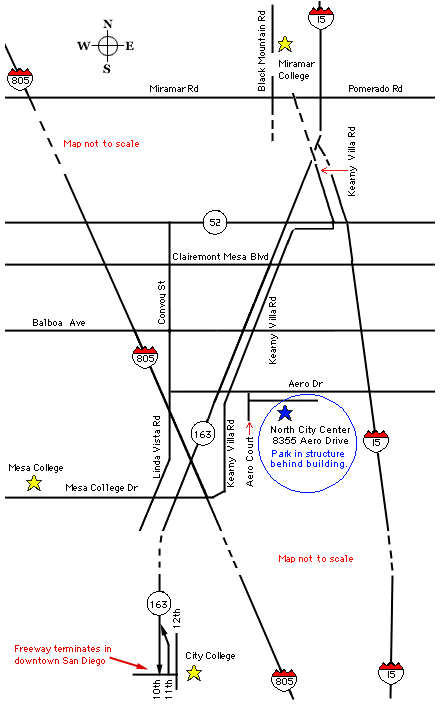
MAP AND DIRECTIONS TO THE 2 NORTH CITY COMPUTER CLASS LOCATIONS IN SAN DIEGO, CA
(scroll down to see the 2 locations)

From Highway 15:
North or South on Hwy. 15
West on Aero Drive
Left on Aero Court (across from Four Points Hotel)
Immediate left on frontage road that runs parallel to Aero Drive
Right at end of frontage road into North City Center
Parking and entrance to classrooms is at back of building
From Convoy Street:
South on Convoy Street
Left (east) on Aero Drive
Right on Aero Court (across from Four Points Hotel)
Immediate left on frontage road that runs parallel to Aero Drive
Right at end of frontage road into North City Center
Parking and entrance to classrooms is at back of building
From Linda Vista Road:
North on Linda Vista Road
Right (east) on Aero Drive
Right on Aero Court (across from Four Points Hotel)
Immediate left on frontage road that runs parallel to Aero Drive
Right at end of frontage road into North City Center
Parking and entrance to classrooms is at back of building
Notes: It is also possible to get to the North City Center from
Highways 163 and 805. Check a map for specific directions
from these points.
BUS TRANSPORTATION CHOICES
Phone: (619) 238-0100
Website: http://www.sdcommute.com
Complete list of all Fall 2010 classes
The Fall semester runs from September 7, 2010 through January 22, 2011.
Your source for life-long learning
Home |
FREE Classes |
Resources |
Net Happenings Newsletters |
My hubby, Roger |
My pup, Rosebud
|